
Universal Asset Sidebar
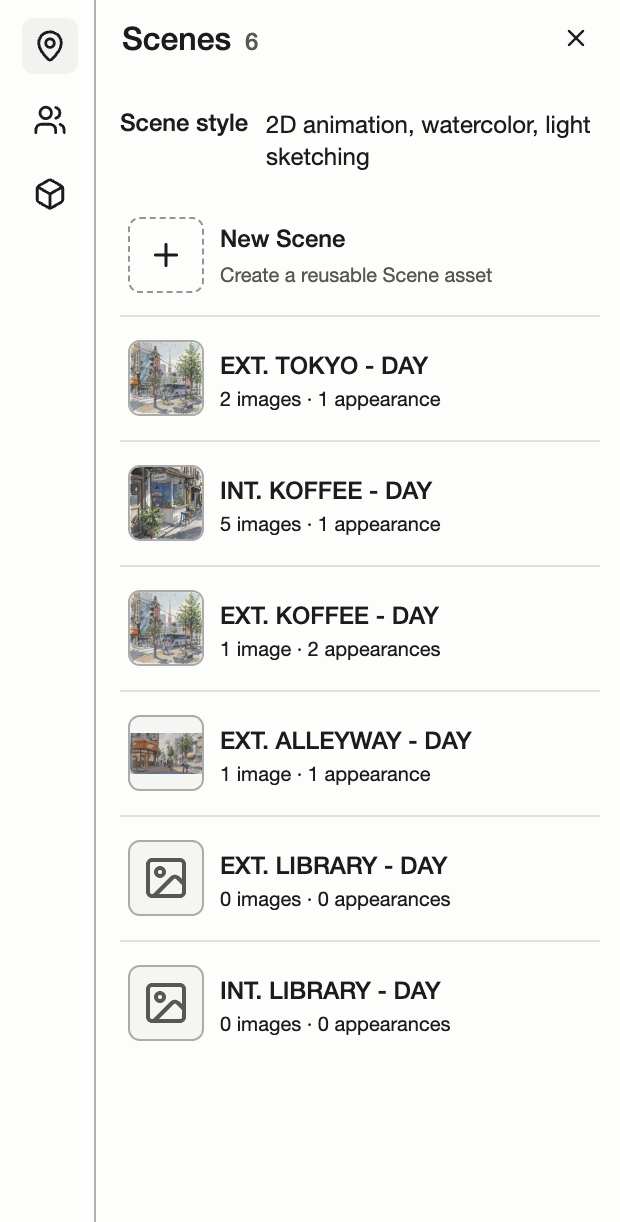
Use the left sidebar to browse Scenes, Characters, and Props. Click any asset to view its details, tag more images, and edit its description.
Universal Asset Sidebar
Asset and Shot Media images can be up to 50 MiB each. If an upload fails, check its error and use Retry. If the image was saved but the view could not refresh, Retry refreshes the view without uploading another copy.
Scenes
Scenes are reusable locations and settings. The Scenes section shows their reference images and how often they appear in your script.
Characters
Characters collect visual references for your cast. The Characters section shows image counts, Scene appearances, and dialogue lines.
Props
Props are reusable objects in your story. The Props section keeps their reference images and script appearances together.
Scenes
Tag location images, interiors, exteriors, and alternate views to a Scene. Open Images to add references with Select from Canvas or Upload image, or drag Canvas images into the asset. Use Description and additional text sections to record the setting, atmosphere, and other visual guidance. Add section shows a spinner while a section is loading. If loading or saving fails, Retry shows recovery progress.
Characters
Tag portraits, full-body images, costumes, and alternate views to a Character. Add images from Canvas or upload them, and use Description and additional text sections for appearance and other character notes. In Voice, choose and preview a Dialogue voice, add delivery cues, and use Create Dialogue to prepare the Character in the Canvas dialogue composer. Add section shows a spinner while a section is loading. If loading or saving fails, Retry shows recovery progress.
Props
Tag reference images, close-ups, and alternate views to a Prop. Add images from Canvas or upload them, and use Description and additional text sections to record materials, scale, and distinguishing features. Add section shows a spinner while a section is loading. If loading or saving fails, Retry shows recovery progress.